> ## Documentation Index
> Fetch the complete documentation index at: https://docs.samplehc.com/llms.txt
> Use this file to discover all available pages before exploring further.
# Database
> Sample provides a fully managed, autoscaling PostgreSQL database powered by AWS for storing data between and across workflows.
## Overview
Every Sample customer gets access to a dedicated, secure PostgreSQL database instance that automatically scales based on your needs. Our database infrastructure is built on AWS's reliable cloud infrastructure, ensuring high availability and performance.
## Creating database objects
You can create various database objects through our editor interface.
### Creating tables
To create a new table in your database: 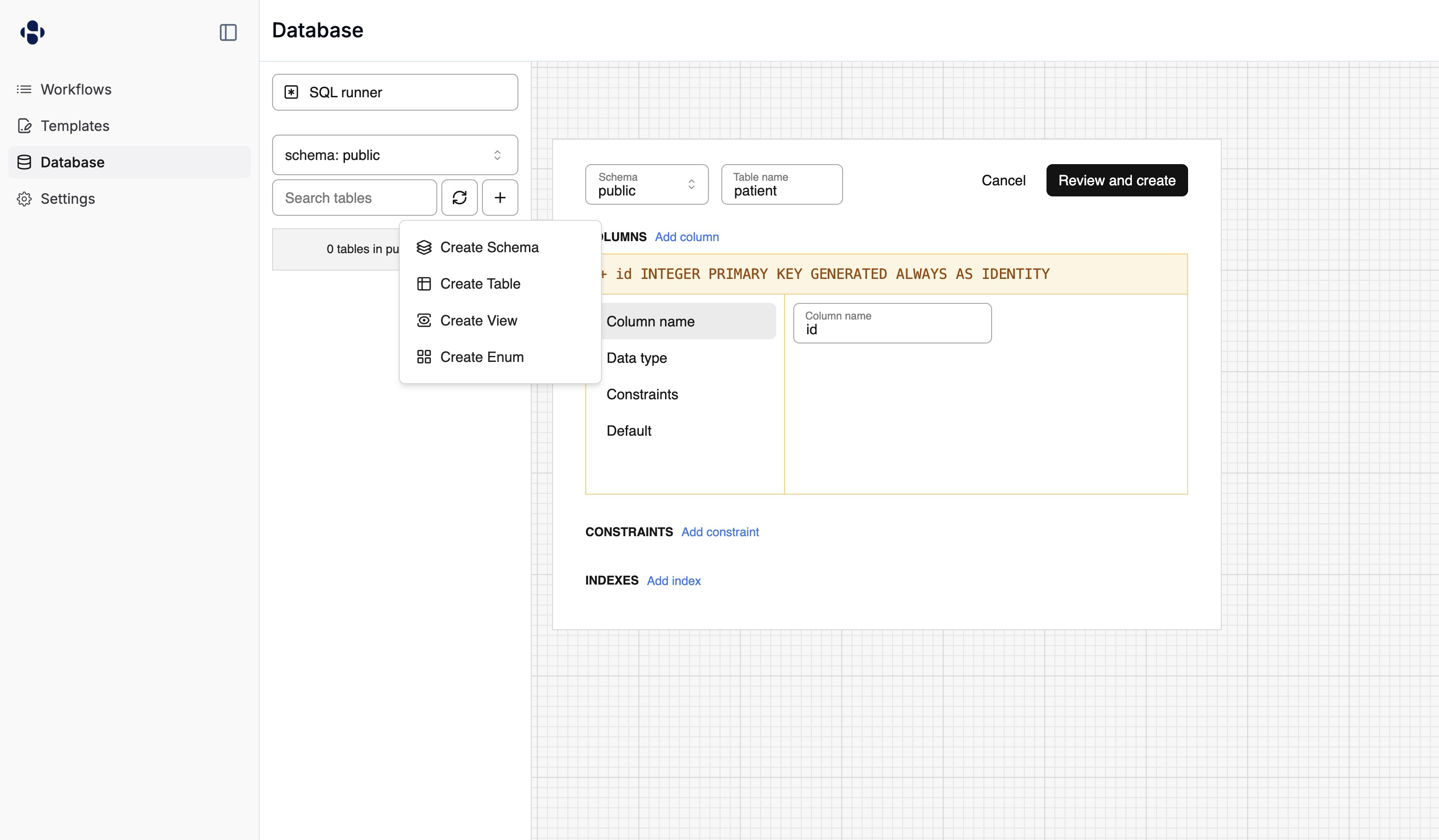 1. Click the "+" button or select "Create Table" from the menu
2. Enter your table name
3. Define columns with:
* Column name
* Data type
* Constraints (PRIMARY KEY, NOT NULL, etc.)
* Default values
4. Add additional constraints or indexes as needed
5. Click "Review and create" to create your table
### Reviewing generated SQL
When creating a table, Sample automatically generates the SQL for you. You can review this SQL before creating the table to ensure it matches your requirements:
1. Click the "+" button or select "Create Table" from the menu
2. Enter your table name
3. Define columns with:
* Column name
* Data type
* Constraints (PRIMARY KEY, NOT NULL, etc.)
* Default values
4. Add additional constraints or indexes as needed
5. Click "Review and create" to create your table
### Reviewing generated SQL
When creating a table, Sample automatically generates the SQL for you. You can review this SQL before creating the table to ensure it matches your requirements: 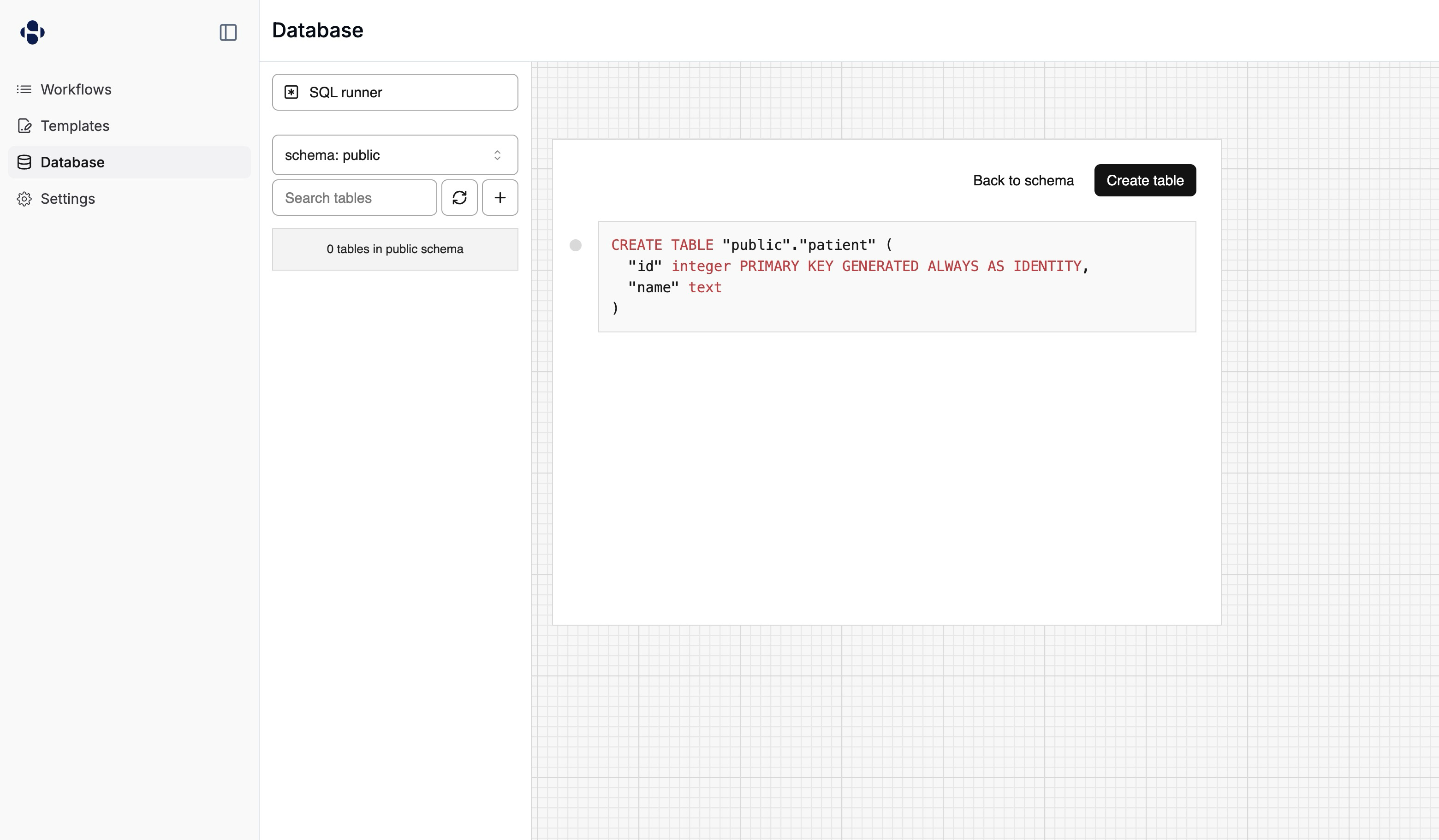 ```sql theme={null}
CREATE TABLE "public"."patient" (
"id" integer PRIMARY KEY GENERATED ALWAYS AS IDENTITY,
"name" text
)
```
This gives you visibility into the exact SQL that will be executed and allows you to:
* Verify column definitions and constraints
* Understand the underlying SQL syntax
* Learn how to write similar SQL statements manually
* Make any necessary adjustments before table creation
You can also create other database objects:
* Schemas for organizing your tables
* Views for saved queries
* Enums for custom data types
## Writing SQL queries
You can interact with your database in two main ways.
### Direct SQL execution
Write and execute SQL queries directly using the SQL runner:
```sql theme={null}
CREATE TABLE "public"."patient" (
"id" integer PRIMARY KEY GENERATED ALWAYS AS IDENTITY,
"name" text
)
```
This gives you visibility into the exact SQL that will be executed and allows you to:
* Verify column definitions and constraints
* Understand the underlying SQL syntax
* Learn how to write similar SQL statements manually
* Make any necessary adjustments before table creation
You can also create other database objects:
* Schemas for organizing your tables
* Views for saved queries
* Enums for custom data types
## Writing SQL queries
You can interact with your database in two main ways.
### Direct SQL execution
Write and execute SQL queries directly using the SQL runner: 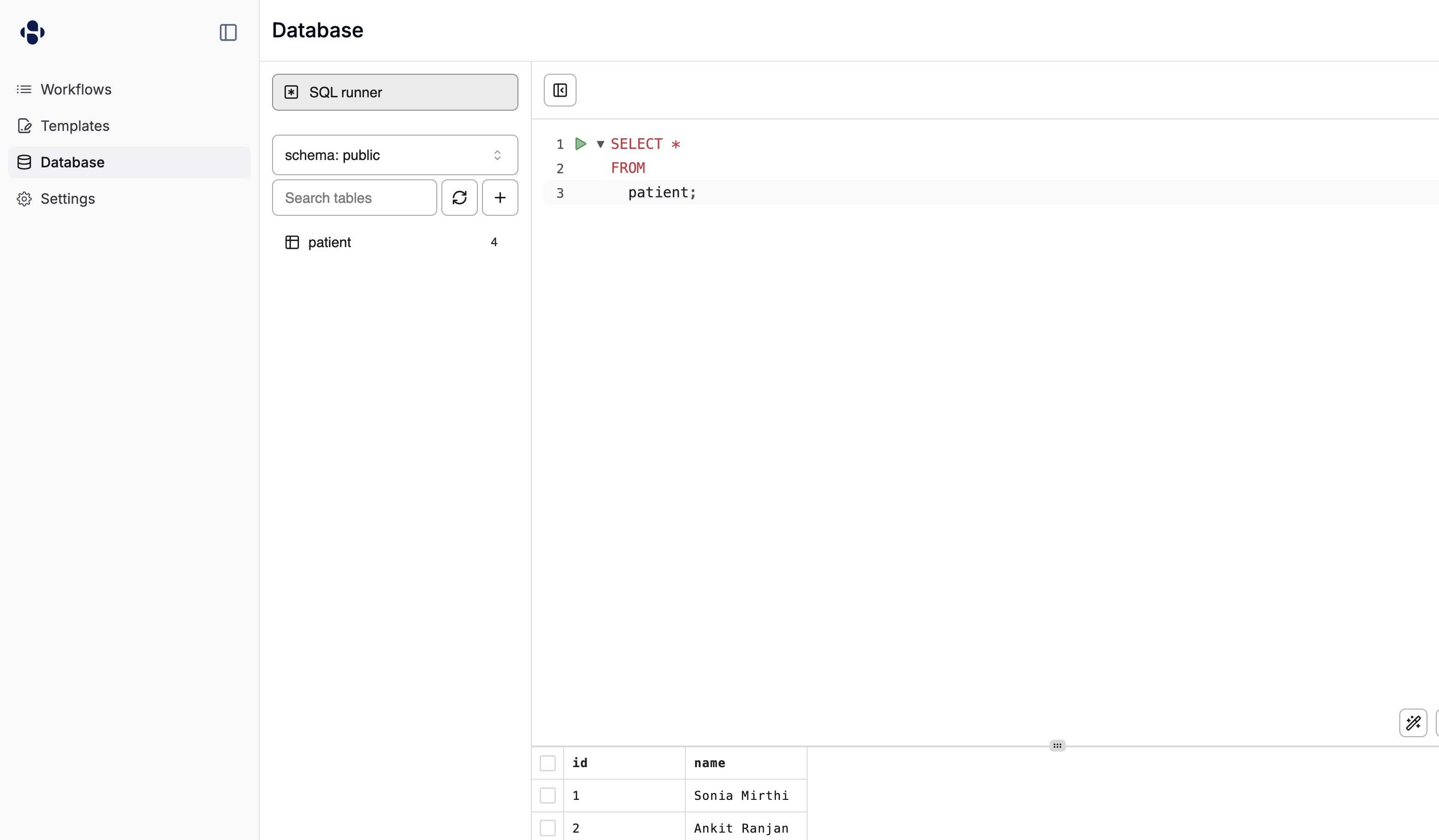 The SQL runner provides an interactive environment where you can:
* Write and execute SQL queries
* See query results in a tabular format
* View execution time and row count
* Run multiple queries in the same session
* Navigate query history
Example query:
```sql theme={null}
SELECT * FROM users WHERE created_at > NOW() - INTERVAL '7 days';
```
### Querying the database from workflows
Use the SampleHC client's [`sql_execute`](/api-reference) method to execute SQL
from a [workflow](/workflows) step. Queries use PostgreSQL-style placeholders
(`$1`, `$2`, ...) with values passed separately via `params`:
```python theme={null}
from client_manager import SampleHealthcareClient
def update_order_status(ctx):
client = SampleHealthcareClient()
result = client.v1.sql_execute(
query="UPDATE orders SET status = $1 WHERE order_id = $2 RETURNING *",
params=["processed", ctx.get_start_data()["order_id"]],
)
return {"updated_rows": result.rows}
```
The response's `rows` field contains the result rows as a list of objects keyed
by column name. Pass `params=[]` for queries with no parameters. If the query
fails, the response contains an `error` field with the failure message instead
of `rows`.
For large result sets, pass `array_mode=True` to return each row as an array
of values instead of an object, which avoids repeating column names in every
row.
Always pass user-provided values through `params` instead of formatting them
into the query string — this prevents SQL injection and quoting issues.
## Viewing table data
Sample provides an interface for viewing and managing your table data:
The SQL runner provides an interactive environment where you can:
* Write and execute SQL queries
* See query results in a tabular format
* View execution time and row count
* Run multiple queries in the same session
* Navigate query history
Example query:
```sql theme={null}
SELECT * FROM users WHERE created_at > NOW() - INTERVAL '7 days';
```
### Querying the database from workflows
Use the SampleHC client's [`sql_execute`](/api-reference) method to execute SQL
from a [workflow](/workflows) step. Queries use PostgreSQL-style placeholders
(`$1`, `$2`, ...) with values passed separately via `params`:
```python theme={null}
from client_manager import SampleHealthcareClient
def update_order_status(ctx):
client = SampleHealthcareClient()
result = client.v1.sql_execute(
query="UPDATE orders SET status = $1 WHERE order_id = $2 RETURNING *",
params=["processed", ctx.get_start_data()["order_id"]],
)
return {"updated_rows": result.rows}
```
The response's `rows` field contains the result rows as a list of objects keyed
by column name. Pass `params=[]` for queries with no parameters. If the query
fails, the response contains an `error` field with the failure message instead
of `rows`.
For large result sets, pass `array_mode=True` to return each row as an array
of values instead of an object, which avoids repeating column names in every
row.
Always pass user-provided values through `params` instead of formatting them
into the query string — this prevents SQL injection and quoting issues.
## Viewing table data
Sample provides an interface for viewing and managing your table data: 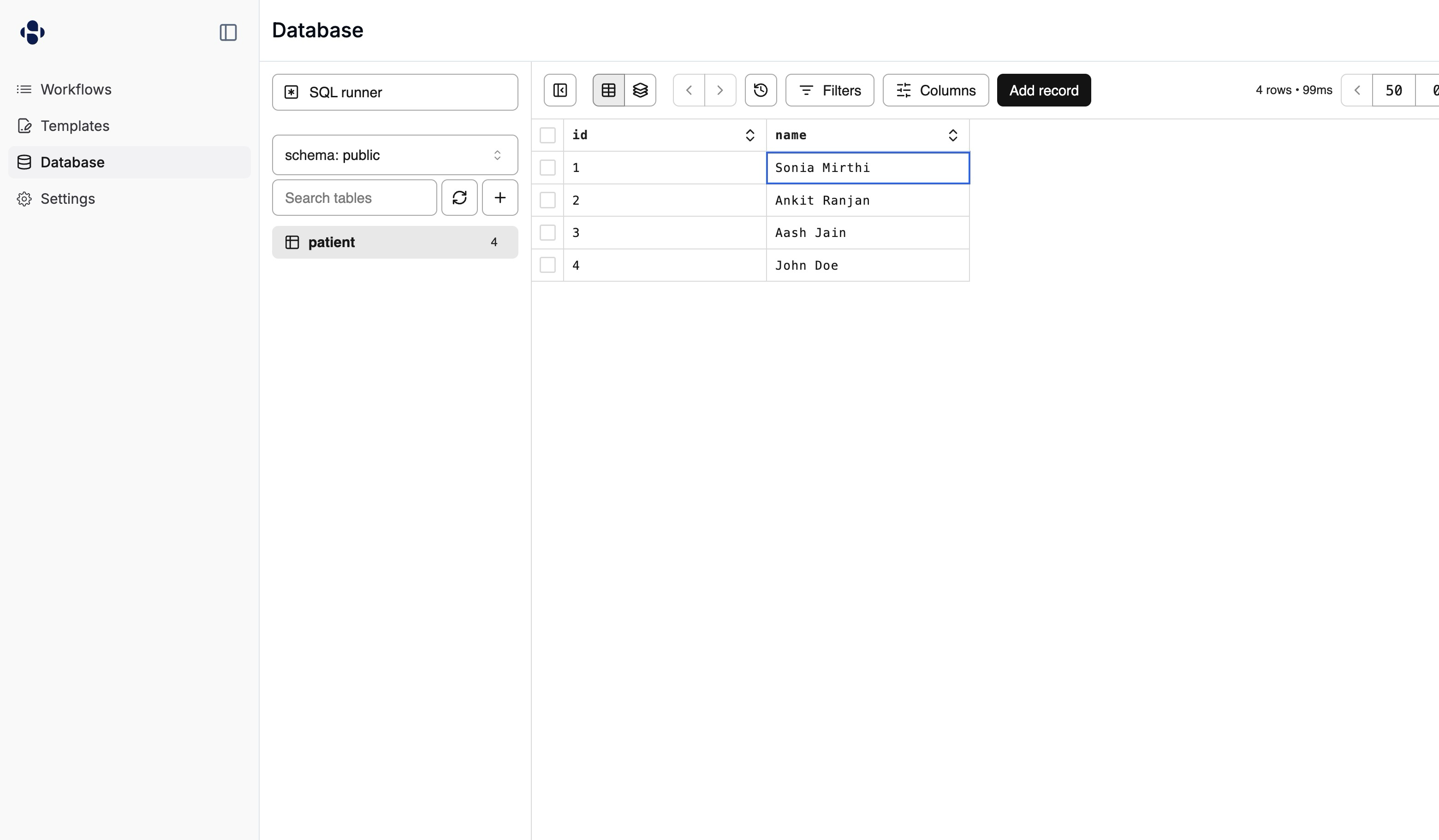 The table view interface offers several features:
* View and edit data in a spreadsheet-like grid
* Sort columns by clicking column headers
* Filter data using the Filters button
* Customize visible columns
* Add new records with the "Add record" button
* Navigate through pages of data
## Key features
* **Autoscaling**: Your database automatically scales compute and storage resources based on usage.
* **Secure**: Your data is encrypted at rest and in transit with VPC isolation.
* **High availability**: The system is built on AWS RDS for enterprise-grade reliability.
The table view interface offers several features:
* View and edit data in a spreadsheet-like grid
* Sort columns by clicking column headers
* Filter data using the Filters button
* Customize visible columns
* Add new records with the "Add record" button
* Navigate through pages of data
## Key features
* **Autoscaling**: Your database automatically scales compute and storage resources based on usage.
* **Secure**: Your data is encrypted at rest and in transit with VPC isolation.
* **High availability**: The system is built on AWS RDS for enterprise-grade reliability.