> ## Documentation Index
> Fetch the complete documentation index at: https://docs.samplehc.com/llms.txt
> Use this file to discover all available pages before exploring further.
# Changelog
> What's new with Sample
Payer data now includes transaction support details and coverage types. You can see which transaction types each payer supports (eligibility checks, claim submissions, claim payments, etc.) and whether they provide medical or dental coverage.
You can now export workflow task lists to CSV format. The new "Export CSV" button appears next to the Metrics button and respects all applied filters, search terms, and sorting. Exported files include workflow ID, workflow name, task ID, all custom columns, and creation time with proper CSV escaping for special characters.
Added an "Admin" button to the workflow tasks screen header when in sample employee view. This provides quick access to admin functionality without needing to navigate to the edit screen first.
You can now search for specific workflow runs by ID directly from the run history panel. Enter a workflow run ID in the new search field and click "Go" to fetch and display that specific run, providing a more efficient way to find individual workflow executions compared to scrolling through the full history.
The tasks screen now includes pagination to view large numbers of tasks more
efficiently. You can also filter tasks by status using the new status filter
in the top bar, allowing you to view completed tasks alongside pending ones.
The support toolbar has now moved underneath the user dropdown. A
notifications button has been added to the sidebar to allow users to view
important notifications.
You can now define custom error handlers for workflow steps using the
`on_failure` option. This allows you to specify what should happen when a step
fails, such as logging the error, sending notifications, or performing cleanup
tasks. Error handlers receive the workflow context and error information,
enabling error recovery and reporting workflows.
You can now control the order in which screens are displayed to users by
setting a priority value on screen steps. Screens with higher priority values
will be shown first when multiple screens are available. This feature works in
both Python workflows, allowing you to ensure critical screens appear before
optional ones in complex workflows.
The GET `/api/v2/task/:taskId` endpoint now returns the `workflowRunId` field,
allowing you to programmatically determine which workflow run a specific task
belongs to. This enhances task tracking and enables better correlation between
tasks and their parent workflow executions.
You can now hide form fields from generated forms using the
`x-formFieldHidden` property in your workflow start data schema. Hidden fields
are useful for system-generated values or internal data that should be
included in the workflow but not shown to users. Fields marked with
`"x-formFieldHidden": true` will be excluded from the form interface while
remaining part of the data structure.
Fixed output tabs not appearing when task output was `false` and improved
Lambda execution error messages to include detailed error information instead
of generic failure messages.
You can now query production audit logs and workflow output data through the
v2/sql API. Two new tables are available: `sample.audit_logs` for organization
audit trail data, and `sample.tasks` tables for individual workflow task
outputs and metadata. This enables SQL-based analysis of workflow performance,
audit compliance, and data extraction from completed workflow runs.
You can now view and copy curl commands to trigger workflows via API directly
from the workflow start dialog.
You can now send physical letters through a new API endpoint. The `POST
/api/v2/communication/letters` endpoint allows you to send PDF documents as
physical letters. You can specify recipient and sender addresses, include
optional metadata, and receive a tracking ID to monitor delivery status. This
feature enables automated physical mail delivery for documents and
communications.
You can now upload multiple files at once when starting workflows that have multi-file upload fields. To enable this, define an array field with `x-formFieldType: "multi-file"` in your start data schema:
```json theme={null}
"documents": {
"type": "array",
"x-formFieldType": "multi-file",
"items": {
"type": "object",
"properties": {
"id": { "type": "string" },
"fileName": { "type": "string" }
}
}
}
```
This approach ensures the JSON schema matches the final transformed data shape (an array of document objects). The implementation supports both the new array-based schema and legacy object-based schemas for backwards compatibility.
You can now edit template slugs for both document and PDF templates. Template
settings include validation to ensure proper slug formatting and prevent
conflicts with existing templates.
You can now add an optional description when uploading files to support. This
allows you to provide context about your uploaded files, making it easier for
the support team to understand and respond to your request. The description
field appears in the support file upload dialog and is included in the support
email notification.
You can now process CSV and Excel files directly in document reasoning
workflows. Large spreadsheets are automatically chunked into manageable
sections (default 50 rows/columns) while preserving header information.
Complex spreadsheets are split into multiple tables based on content
structure.
Enhanced user experience in the workflow graph view by adding loading
indicators. When viewing workflow graphs and deployment details, you'll now
see visual loading spinners with descriptive messages while data is being
fetched. This provides clear feedback during loading states, making it easier
to understand when the system is processing requests and improving overall
responsiveness of the workflow editor.
You can now toggle between code and graph views while editing workflows. A new
switch in the workflow editor allows you to seamlessly switch between the
traditional code editing interface and a visual graph representation of your
workflow. When in graph mode, you'll see a visual diagram of your workflow
structure, making it easier to understand complex workflows at a glance. This
feature works for both development and production deployments, giving you
better visibility into your workflow architecture.
Fixed an issue where duplicating workflows that were already duplicates would
fail. The workflow duplication process now uses an improved approach that
allows you to duplicate any workflow, even if it was previously duplicated
from another workflow. This resolves conflicts that previously prevented
creating copies of existing duplicated workflows.
Fixed scrolling issue in the v2 workflow JSON editor. Users can now scroll
vertically when JSON content exceeds the editor's fixed height, making it
easier to work with larger JSON payloads in workflow configurations.
You can now access a new workflow template for medical record summarization.
This template allows you to summarize and get specific answers over medical
records, making it easier to extract key information from patient
documentation. The template provides a structured approach to processing
medical records and answering targeted questions about patient care, helping
healthcare organizations streamline their documentation review workflows.
You can now view database views alongside tables in the SampleDB interface.
The Database tab now displays both tables and views, providing comprehensive
visibility into your database schema. This enhancement improves database
navigation and makes it easier to work with complex database structures that
include views for data reporting and analysis.
You can now complete async reuslts after a specified delay or at a specific
time through a new API endpoint. The `POST /api/v2/async-result/sleep`
endpoint.
You can now subscribe to changelog updates via RSS feed. The new RSS endpoint
at `/api/v2/changelog/feed.xml` automatically generates an RSS feed from the
changelog, allowing you to stay updated on the latest Sample Healthcare
features and improvements through your favorite RSS reader. The feed includes
detailed descriptions of each update with proper formatting and links back to
the changelog for easy reference.
You can now estimate patient costs for medical services through a new API
endpoint. The `POST /api/v2/clearinghouse/patient-cost` endpoint accepts
eligibility responses and line items to calculate what patients will owe after
insurance coverage. The calculator supports complex scenarios including
multiple payers with coordination of benefits (COB), deductibles, copays, and
coinsurance. It returns detailed breakdowns showing total patient cost, total
payer cost, and step-by-step calculations for each insurance plan. This
feature helps healthcare organizations provide accurate cost estimates to
patients before services are rendered.
You can now duplicate v2 workflows directly from the workflow actions menu.
When duplicating a workflow, you can customize the name and slug for the new
workflow. The duplication process creates a complete copy of the workflow
including all environment variables, allowing you to quickly create variations
of existing workflows without starting from scratch. After duplication, you'll
be automatically navigated to the editor for the new workflow.
You can now add custom validation logic to screen steps using the new
`before_complete` hook. This hook runs before a screen step completes and
allows you to validate user input or perform preprocessing tasks. If
validation fails, you can throw `ApiError`s that will be returned as proper
HTTP error responses to the client.
You can now process and view FHIR documents (JSON and JSONL formats) in
document reasoning workflows. The DocumentViewer component now supports FHIR
documents alongside PDFs, allowing you to view structured healthcare data with
proper formatting and navigation. FHIR documents are automatically processed
through the chunker for use in reasoning tasks, enabling AI analysis of
clinical data stored in FHIR format. This enhancement significantly expands
the types of healthcare documents you can work with in Sample workflows.
You can now retrieve patient health information and documents from Health
Information Exchanges (HIE) through new API endpoints. The `POST
/api/v2/hie/patient/:patientId/fhir` endpoint allows you to get FHIR data for
a patient, while `POST /api/v2/hie/patient/:patientId/documents` lets you
retrieve patient documents filtered by MIME type. Both endpoints return an
async result ID that you can use to track the progress and retrieve the
results when ready. This integration enables healthcare organizations to
access comprehensive patient data from external HIE networks for improved care
coordination and decision-making.
You can now transform Sample JSON documents to HTML through a new API
endpoint. The `POST /api/v2/document/json-to-html` endpoint accepts a JSON
object and returns it as formatted HTML, preserving all formatting including
bold text, headings, lists, tables, citations, and other rich content. This
feature is useful for rendering Sample documents in external applications or
generating HTML reports from structured document data.
You can now retrieve individual task details through a new API endpoint. The
`GET /api/v2/task/:taskId` endpoint allows you to programmatically fetch
specific task information including ID, status, output, and state. This
enhancement provides developers and integrations with granular access to task
data, complementing the existing task management APIs for more comprehensive
workflow automation.
You can now confirm API key deletions through a new confirmation dialog. When
deleting an API key from the settings page, a dialog will appear asking you to
confirm the action. This prevents accidental deletions and includes a warning
that deletion is permanent and will disable any applications using that key.
This enhancement improves security and helps prevent disruption to API
integrations.
You can now cancel individual tasks through a new API endpoint. The `POST
/api/v2/task/:taskId/cancel` endpoint allows you to programmatically cancel
specific tasks by their ID, preventing them from being executed and halting
any subsequent tasks in the workflow. This complements the existing
workflow-level cancellation feature and provides more granular control for API
integrations and automated workflows.
You can now view feedback for specific workflow releases through a new
"Feedback" tab in the release detail panel. This enhancement allows teams to
see user feedback organized by step ID for each deployment, making it easier
to track user insights and identify areas for improvement on a per-release
basis. Feedback is displayed with user attribution and timestamps, providing
valuable context for workflow optimization.
You can now cancel all running tasks for a workflow directly from the workflow
editor. A new "Cancel tasks" button allows you to stop all currently running,
suspended, and waiting-dependencies tasks in one action. This feature is
helpful when workflows get stuck or when you need to stop long-running
processes quickly.
You can now see additional details about your workflow runs directly in the
run history. When viewing the run history, an info icon next to each run
provides a tooltip showing how the workflow was triggered (manual, API, or
cron) and the start data that was used to initialize the run. This enhanced
visibility helps teams better understand and debug their workflow executions.
You can now provide feedback on any task in your workflow runs. A new feedback
button appears in the task interface, allowing you to share thoughts,
suggestions, or report issues. All feedback is stored with user attribution
and can be viewed in a dedicated "Feedback" tab within the task details. This
helps teams continuously improve their workflows and capture user insights
directly where the work happens.
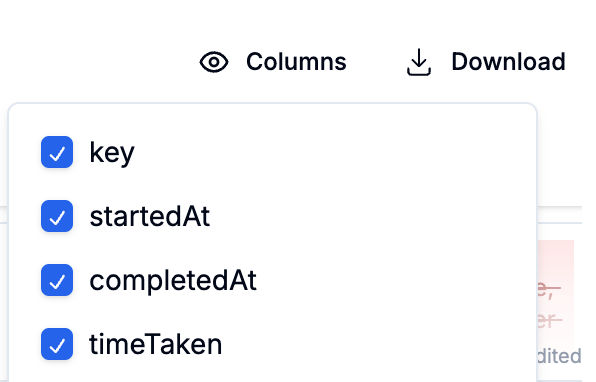
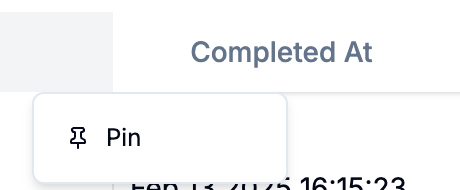
We've added a new table for document reasoning feedback. You can now pin
columns to keep them visible as you scroll and hide columns that aren't
needed. Hidden columns are automatically excluded from exports. You can access
this table via the metrics tab in the editor.
We've added a new step type for workflows that allows you to trigger another
workflow. This is helpful for creating more complex workflows that can be
reused across different workflows.
We've added metrics to the document classification step. You can now see the
accuracy and number of documents classified over the last 12 months or 7 days.
You can now send encrypted emails to the recipients. This feature is
particularly useful for sending sensitive information. When an encrypted email
is sent, the recipient will receive an email with a link to access the
content. Upon clicking the link, the recipient will be directed to a page
where they can request a one-time password (OTP) to unlock and view the
content. The encrypted link will remain valid for 30 days. You can read more
about this encrypted email feature
[here](https://docs.samplehc.com/encrypted-email).
We've added a new feature that sends you an email when a workflow fails. This
is helpful when you want to quickly identify the cause of a workflow failure
that is in the hand of your users. You can receive emails by going to the
workflow settings, and then adding your email where you'd like to receive
error emails. You can read more about error reporting
[here](http://docs.samplehc.com/debugging#error-reporting-in-workflows).
We're excited to announce the availability of SampleDB, our managed PostgreSQL
database service. SampleDB provides: - A fully managed, autoscaling PostgreSQL
database for each organization - Intuitive interface for creating and managing
database objects - Built-in SQL runner for direct query execution - Seamless
integration with Sample workflows through database blocks 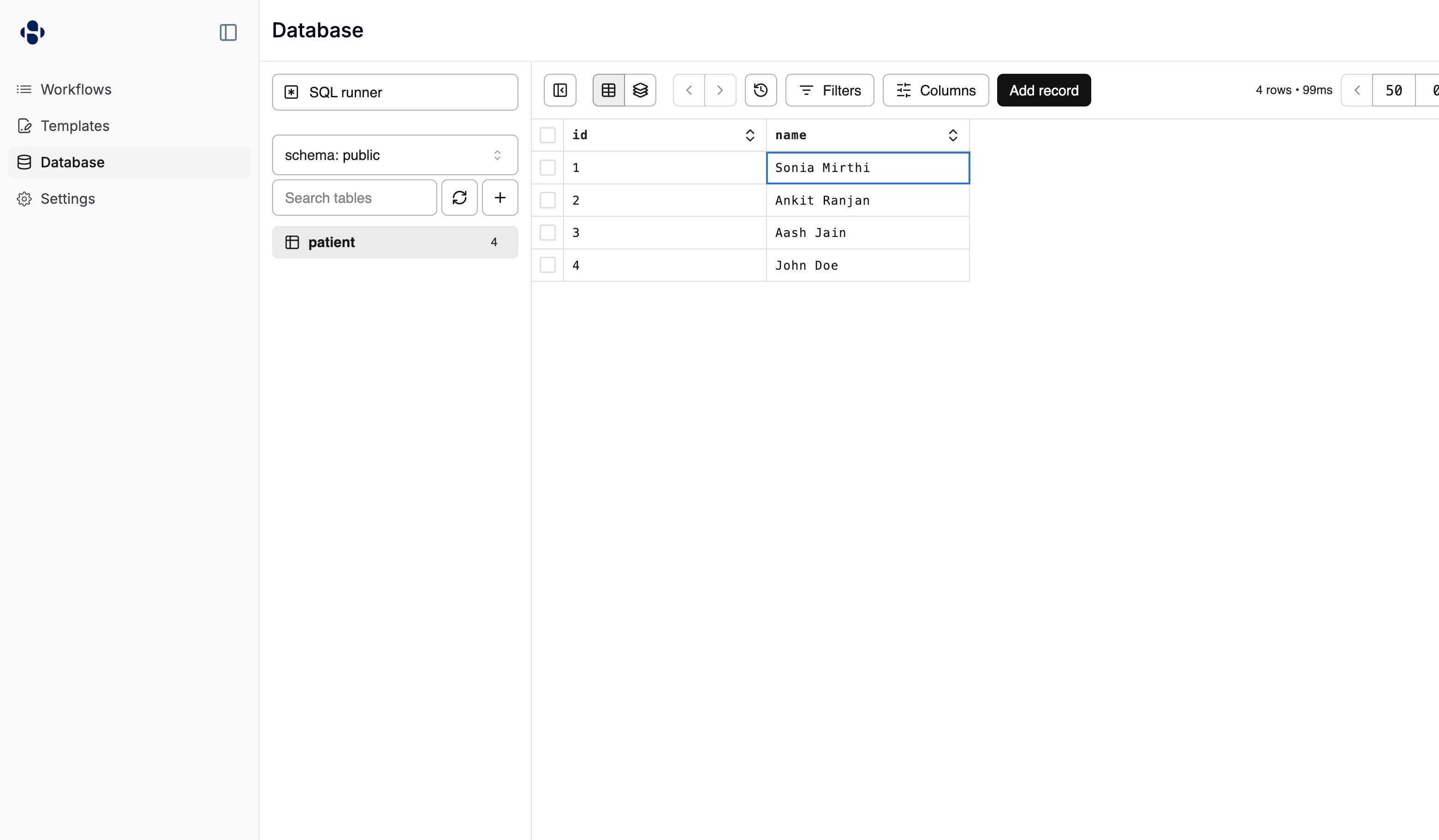 Check out our [database
documentation](https://docs.samplehc.com/database) to learn more about using
SampleDB in your workflows.
You can now see completed document extraction steps in the completed tab of
the tasks table. You can also see the results of the document extraction step
by clicking on the completed item in the tasks table. This is helpful for
reviewing the results of document extraction steps, especially when there was
no human review needed.
### Optional fields You can now mark fields as optional in a manual form. If a
field is marked as optional, it will not be required to complete the form. ###
Multi-upload fields With the multi-upload field in a manual form, you can now
upload multiple zip and pdf files at once.
You can now star your favorite workflows to make them easy to access. Starred
workflows will default to being on top of your workflows list and will appear
in the sidebar for easy access.
We've added a [documentation page](https://docs.samplehc.com) for our
products. This page will be updated regularly. Please let us know if there is
helpful information that is missing.
You can now resize the document extraction panel to your liking.
You can now see who is viewing a task on the top right corner of a task. This
makes sure you don't accidentally have conflicting changes. Furthermore, loops
will now prioritize navigating users to unviewed tasks to make it easier when
multiple people are working on the same worklist.
We've improved the text output for document generation steps. Now, you can
access the text of a generated document in `output.text`, alongside the
document. This is helpful when you want to use a templated editor for text
that is consumed in follow up steps, such as writing an email body.
### Release management We've added a new feature that allows you to manage
releases for your workflows. This allows you to create new releases, promote
releases to production, and test out draft releases. ### Improved cron jobs
We've improved the reliability of scheduled workflows. Now, you can schedule
workflows with minute-level precision. We've also updated the cron expression
editor to show a more accurate description of the cron expression in your
timezone.
Check out our [database
documentation](https://docs.samplehc.com/database) to learn more about using
SampleDB in your workflows.
You can now see completed document extraction steps in the completed tab of
the tasks table. You can also see the results of the document extraction step
by clicking on the completed item in the tasks table. This is helpful for
reviewing the results of document extraction steps, especially when there was
no human review needed.
### Optional fields You can now mark fields as optional in a manual form. If a
field is marked as optional, it will not be required to complete the form. ###
Multi-upload fields With the multi-upload field in a manual form, you can now
upload multiple zip and pdf files at once.
You can now star your favorite workflows to make them easy to access. Starred
workflows will default to being on top of your workflows list and will appear
in the sidebar for easy access.
We've added a [documentation page](https://docs.samplehc.com) for our
products. This page will be updated regularly. Please let us know if there is
helpful information that is missing.
You can now resize the document extraction panel to your liking.
You can now see who is viewing a task on the top right corner of a task. This
makes sure you don't accidentally have conflicting changes. Furthermore, loops
will now prioritize navigating users to unviewed tasks to make it easier when
multiple people are working on the same worklist.
We've improved the text output for document generation steps. Now, you can
access the text of a generated document in `output.text`, alongside the
document. This is helpful when you want to use a templated editor for text
that is consumed in follow up steps, such as writing an email body.
### Release management We've added a new feature that allows you to manage
releases for your workflows. This allows you to create new releases, promote
releases to production, and test out draft releases. ### Improved cron jobs
We've improved the reliability of scheduled workflows. Now, you can schedule
workflows with minute-level precision. We've also updated the cron expression
editor to show a more accurate description of the cron expression in your
timezone. 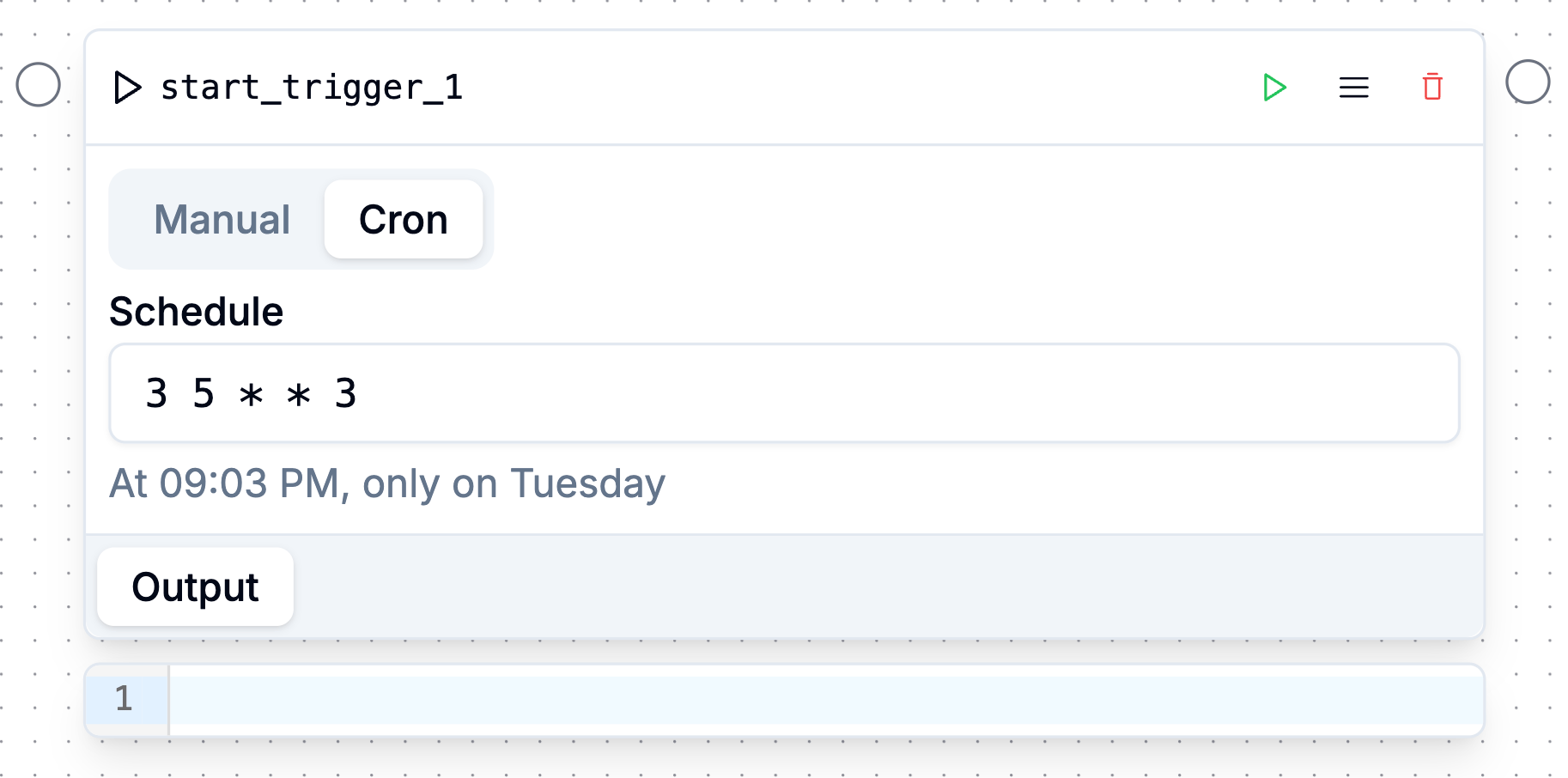 ###
Improvements - Increased reliability on extraction steps - Increased
reliability on the Glidian step
### Virtualized PDF splitting We've added a new feature that allows us to
render PDFs in a virtualized list. This should improve performance for
workflows that need to split large PDFs. ### Improvements - Fixed a bug where
the PDF viewer would ocassionally show a blank page.
### Clicking on a completed task will now open the cited answer When you click
on a completed task, you can now see the cited answer by clicking on the
question's label. ### Improvements - Improved the stability of faxing steps. -
Column values will now be refreshed when a task is completed.
### Sidebar layout You can now toggle the sidebar on the left side of the
screen. This is useful for people who have smaller screens. ### Improvements -
General reliability improvements for steps in a loop.
### Send fax You can now see the sent fax and status after they are completed
by clicking on the completed item in the tasks table. ### Improvements - You
can now jump to a specific task from the debug run panel. - The debug run
panel better sorts the tasks in each iteration. - We've fixed a bug where
faxes in for loops were not continuing to the next step. - Filtering a node
model table will now search all columns, not just the "Key" column.
### Combine document steps You can now configure human review for "Combine
document" steps. If set, reviewers will be able to re-order and remove
documents from the combined document. This is helpful when picking
attachements to include in an authorization or appeal packet. ### Improvements
* Glidian and Careviso integrations now support connecting to staging
environments for workflow development. - You can now sort and hide built-in
columns in the workflow editor, alongside custom columns you create.
### Configurable columns You can now sort and hide built-in columns in the
workflow editor, alongside custom columns you create. ### Improvements -
Select fields in manual form steps with a lot of options will now use a
combobox selector which allows users to quickly search through results. -
We've improved the stability of workflow logouts, leading to fewer accidental
sign-outs.
### Markdown in email You can now use Markdown in the email step of a
workflow. This allows you to have more rich emails with headings, lists, and
other formatting. ### Workflow start link To the right of "Start workflow",
you can now copy the link to start the workflow. When this link is clicked, it
will automatically jump to the start of the workflow. This is useful for
operational users who want to quickly start a workflow. ### Improvements - You
can now sort the workflows table by clicking on the header. - Conditional
blocks now correctly show the output during debugging. - Better autocomplete
for `std` functions.
### SampleDB You can now store data in a PostgreSQL database specifically for
your organization, under the new "Database" section of the product. You can
also make SQL queries to this database with the "Query SampleDB" block. This
database is helpful for storing state across workflows. We're excited to see
what you build with SampleDB. ### CSV ordering You can now specify the order
of the columns in a CSV. You can try this out by modifying the `columnOrder`
property of a CSV node. ### Manual forms We've added some new controls to
manual forms, including the ability to specify a default value for select
fields and to add Markdown details at the top of the form. ### Improvements -
We added the total amount of pages shown on the top right of any PDF viewer. -
You can now cancel manual tasks. - You can now sort workflows by their name
and creation date.
### PDF Templates You can now create templates directly from PDFs. This allows
you to use PDFs that are uploaded as workflows. ### Improvements - Improved
speed of page navigations during multi-step workflows. - Improved the accuracy
and speed of document splitting and classification tasks.
### Submit prior authorizations to Careviso Following up on Glidian, we now
allow you to submit prior authorizations to Careviso through the workflow
editor. You can now compose & configure your prior authorization submissions
between multiple networks. ### Manual form configurations You can now
configure whether manual forms will show up in your worklists. This
configuration is useful for hiding manual form tasks that are triggered by the
"Start workflow" button.
We've launched support for submitting prior authorizations to Glidian through
the workflow editor. This feature allows you to create a workflow that will
submit a prior authorization to Glidian. The block supports configuring
default payers, as well as answers to clinical questions and other submission
requirements.
### Fine-grained authorization for workflows We've added a new authorization
system for workflows that allows you to specify exactly which users have
access to run your workflows. These rules also limit who can edit existing
workflows and create new workflows. You can now limit users by directory
group, or even specific individuals, once you've established a Directory Sync
connection. ### Salesforce CRUD step for workflows We've added a new step type
for workflows that allows you to perform CRUD (Create, Read, Update, Delete)
operations on Salesforce records. This step can be combined with our other
Salesforce steps, such as SOQL queries and file downloads, to create more
powerful workflows that interact with Salesforce. ### Step metrics – starting
with document extraction We've added basic metrics for document extraction
steps. You can get to this by clicking on the hamburger menu on the top right
corner of a step and then clicking on the "Metrics" tab.
###
Improvements - Increased reliability on extraction steps - Increased
reliability on the Glidian step
### Virtualized PDF splitting We've added a new feature that allows us to
render PDFs in a virtualized list. This should improve performance for
workflows that need to split large PDFs. ### Improvements - Fixed a bug where
the PDF viewer would ocassionally show a blank page.
### Clicking on a completed task will now open the cited answer When you click
on a completed task, you can now see the cited answer by clicking on the
question's label. ### Improvements - Improved the stability of faxing steps. -
Column values will now be refreshed when a task is completed.
### Sidebar layout You can now toggle the sidebar on the left side of the
screen. This is useful for people who have smaller screens. ### Improvements -
General reliability improvements for steps in a loop.
### Send fax You can now see the sent fax and status after they are completed
by clicking on the completed item in the tasks table. ### Improvements - You
can now jump to a specific task from the debug run panel. - The debug run
panel better sorts the tasks in each iteration. - We've fixed a bug where
faxes in for loops were not continuing to the next step. - Filtering a node
model table will now search all columns, not just the "Key" column.
### Combine document steps You can now configure human review for "Combine
document" steps. If set, reviewers will be able to re-order and remove
documents from the combined document. This is helpful when picking
attachements to include in an authorization or appeal packet. ### Improvements
* Glidian and Careviso integrations now support connecting to staging
environments for workflow development. - You can now sort and hide built-in
columns in the workflow editor, alongside custom columns you create.
### Configurable columns You can now sort and hide built-in columns in the
workflow editor, alongside custom columns you create. ### Improvements -
Select fields in manual form steps with a lot of options will now use a
combobox selector which allows users to quickly search through results. -
We've improved the stability of workflow logouts, leading to fewer accidental
sign-outs.
### Markdown in email You can now use Markdown in the email step of a
workflow. This allows you to have more rich emails with headings, lists, and
other formatting. ### Workflow start link To the right of "Start workflow",
you can now copy the link to start the workflow. When this link is clicked, it
will automatically jump to the start of the workflow. This is useful for
operational users who want to quickly start a workflow. ### Improvements - You
can now sort the workflows table by clicking on the header. - Conditional
blocks now correctly show the output during debugging. - Better autocomplete
for `std` functions.
### SampleDB You can now store data in a PostgreSQL database specifically for
your organization, under the new "Database" section of the product. You can
also make SQL queries to this database with the "Query SampleDB" block. This
database is helpful for storing state across workflows. We're excited to see
what you build with SampleDB. ### CSV ordering You can now specify the order
of the columns in a CSV. You can try this out by modifying the `columnOrder`
property of a CSV node. ### Manual forms We've added some new controls to
manual forms, including the ability to specify a default value for select
fields and to add Markdown details at the top of the form. ### Improvements -
We added the total amount of pages shown on the top right of any PDF viewer. -
You can now cancel manual tasks. - You can now sort workflows by their name
and creation date.
### PDF Templates You can now create templates directly from PDFs. This allows
you to use PDFs that are uploaded as workflows. ### Improvements - Improved
speed of page navigations during multi-step workflows. - Improved the accuracy
and speed of document splitting and classification tasks.
### Submit prior authorizations to Careviso Following up on Glidian, we now
allow you to submit prior authorizations to Careviso through the workflow
editor. You can now compose & configure your prior authorization submissions
between multiple networks. ### Manual form configurations You can now
configure whether manual forms will show up in your worklists. This
configuration is useful for hiding manual form tasks that are triggered by the
"Start workflow" button.
We've launched support for submitting prior authorizations to Glidian through
the workflow editor. This feature allows you to create a workflow that will
submit a prior authorization to Glidian. The block supports configuring
default payers, as well as answers to clinical questions and other submission
requirements.
### Fine-grained authorization for workflows We've added a new authorization
system for workflows that allows you to specify exactly which users have
access to run your workflows. These rules also limit who can edit existing
workflows and create new workflows. You can now limit users by directory
group, or even specific individuals, once you've established a Directory Sync
connection. ### Salesforce CRUD step for workflows We've added a new step type
for workflows that allows you to perform CRUD (Create, Read, Update, Delete)
operations on Salesforce records. This step can be combined with our other
Salesforce steps, such as SOQL queries and file downloads, to create more
powerful workflows that interact with Salesforce. ### Step metrics – starting
with document extraction We've added basic metrics for document extraction
steps. You can get to this by clicking on the hamburger menu on the top right
corner of a step and then clicking on the "Metrics" tab. 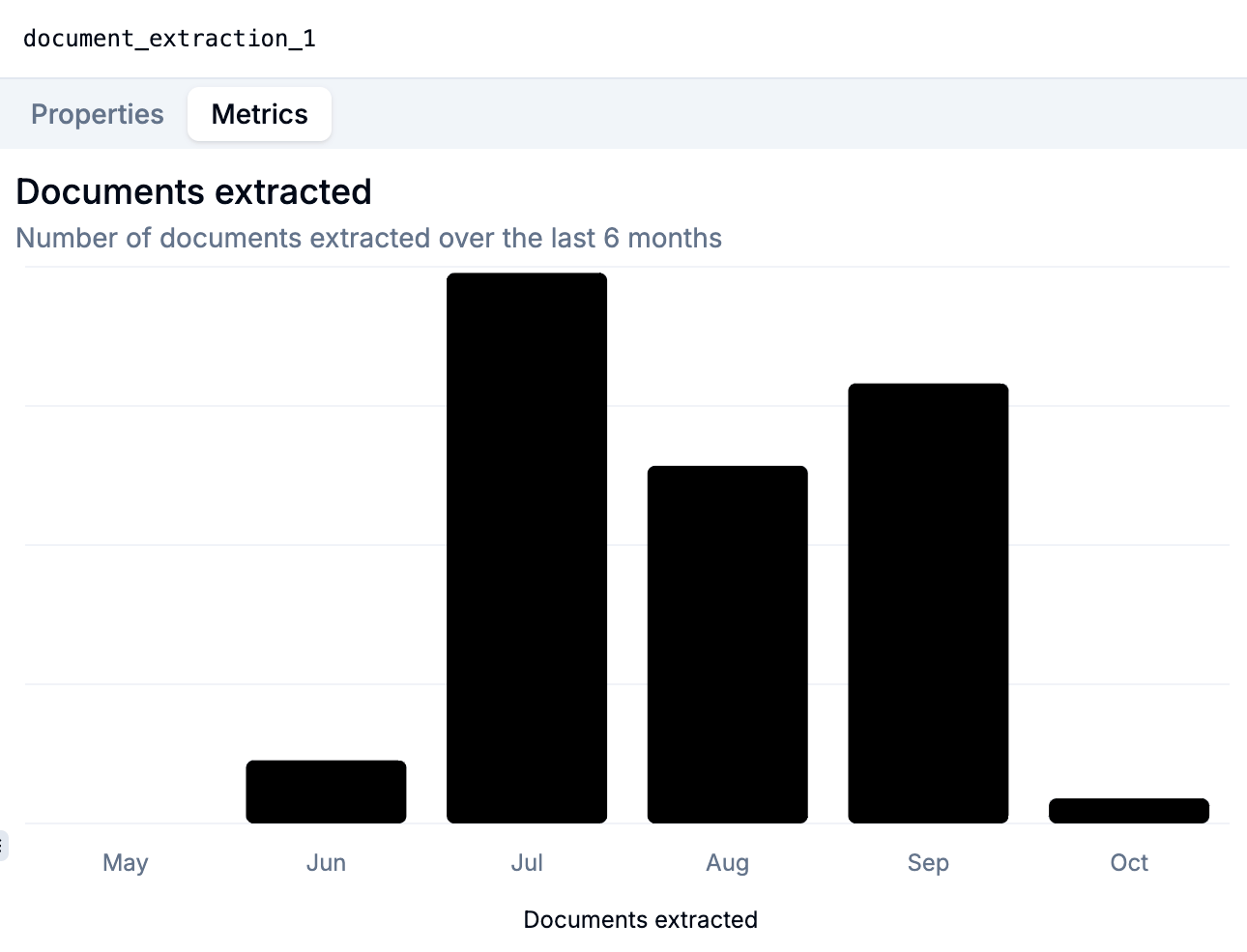 These metrics
show the number of documents extracted over the last 6 months. We'll be adding
more metrics to different types of steps – please let us know what you'd like
to see. ### Client-side performance improvements We've improved the
performance of our client-side application by optimizing the way we handle
PDFs. This includes: document splitting, document classification, and document
extraction tasks. These enhancements will result in a smoother, more
responsive experience for our users when working with longer documents. ###
Improvements - Fixed a bug where large documents would occasionally appear
blurry.
We've released our first changelog at [https://changelog.samplehc.com](https://changelog.samplehc.com). You can
follow the RSS feed, or periodically check this website for updates.
These metrics
show the number of documents extracted over the last 6 months. We'll be adding
more metrics to different types of steps – please let us know what you'd like
to see. ### Client-side performance improvements We've improved the
performance of our client-side application by optimizing the way we handle
PDFs. This includes: document splitting, document classification, and document
extraction tasks. These enhancements will result in a smoother, more
responsive experience for our users when working with longer documents. ###
Improvements - Fixed a bug where large documents would occasionally appear
blurry.
We've released our first changelog at [https://changelog.samplehc.com](https://changelog.samplehc.com). You can
follow the RSS feed, or periodically check this website for updates.